BlogGet Cited
How to track brand mentions in ChatGPT: free method and template
Ask ten founders whether ChatGPT recommends their product and most will say “I think so”. They asked it once, in their own account, and it mentioned them. That’s not tracking. Your own account is personalised by your chat history, so it’s the least reliable place to look.
Real tracking answers four questions every month: for the prompts my buyers ask, am I named, am I linked, who else shows up, and is any of it turning into visits and signups? You can answer all four for free.
This guide is for marketers and founders who want a reliable monthly number without paying for an AI visibility platform yet.
What you’re actually tracking
“Brand mentions in ChatGPT” covers four different things. Track them on separate lines, because they move independently:
| Signal | What it means | Where to see it |
|---|---|---|
| Brand mention | ChatGPT names you in the answer | Your prompt sheet |
| Linked citation | ChatGPT shows your page as a clickable source | Your prompt sheet |
| Referral traffic | Someone clicked through from ChatGPT to your site | GA4 (with the setup below) |
| Accuracy | What ChatGPT says about your pricing, features and positioning is correct | Your prompt sheet |
Most tools blend these into one “visibility score”. Don’t. You can be named on every prompt and never linked, or linked as a source while the answer recommends a rival. Each case needs a different fix.
Step 1: Build your prompt list
Write 20–30 prompts the way your buyers would type them into ChatGPT. Not keywords: full questions with context. Pull them from sales-call notes, support tickets, Reddit thread titles in your category, and Google’s “People also ask” box. Cover five types:
| Type | Example | How many |
|---|---|---|
| Discovery | What’s the best invoicing tool for a 5-person agency? | 6–8 |
| Comparison | [Your brand] vs [rival] for a small finance team | 4–6 |
| Alternatives | Cheaper alternatives to [rival] with time tracking | 4–6 |
| Problem | How do I stop clients paying invoices late? | 4–6 |
| Brand | Is [your brand] worth it? / How much does [your brand] cost? | 2–4 |
The brand prompts are where you check accuracy. If ChatGPT gets your pricing wrong, buyers walk into sales calls with the wrong number. Our guide to getting cited by ChatGPT covers prompt research in more depth.
Step 2: Set up your tracking sheet
One row per prompt, per engine, per month. Copy these columns into a Google Sheet:
Month | Prompt | Type | Engine | Run (1/2/3) | Named? (Y/N) | Position (1st, 2nd…) | Linked? (Y/N) | Our URL cited | Other sources cited | Competitors named | Accuracy issue | Notes
Track ChatGPT and Perplexity at minimum. Add Gemini and Google AI Mode if your buyers use Google heavily. Keep the prompt wording identical month to month, or the trend means nothing.
Step 3: Run the prompts the right way
- Use a temporary chat or a logged-out browser. Your own account knows what you’ve asked before and leans toward you.
- Make sure the answer used search. Look for sources under the answer. If there are none, ask the same prompt again with search turned on, and log both.
- Run each prompt three times. AI answers vary between runs. Something Inc’s citation study ran every query three times for the same reason. Count a mention if you appear in at least two of three runs.
- Click every source. Note which pages are cited, especially third-party pages that name your competitors. Those are your outreach list.
- Log immediately. Don’t trust memory across 30 prompts and three engines.
Thirty prompts, three runs, two engines is 180 answers. With practice it takes about two hours. Do it on the same day each month, such as the first Monday.
Step 4: Turn the sheet into three numbers
Report these at the top of the sheet every month:
Mention rate      = prompts where you’re named ÷ total prompts
Citation rate     = prompts where your page is linked ÷ total prompts
Share of voice    = your mentions ÷ all brand mentions across your prompt set
Share of voice is the one leadership understands fastest: “ChatGPT names us in 18% of brand mentions for our category, up from 9% in March. Rival A is at 34%.” Split it by prompt type too. A low share on alternatives prompts usually means you need an alternatives page; a low share on discovery prompts usually means you’re missing from the listicles that get cited.
Step 5: Track ChatGPT traffic in GA4
ChatGPT search adds utm_source=chatgpt.com to links in its results, but not a medium. Because of that, GA4 often files these visits under “Unassigned” instead of a referral or AI channel, and some clicks arrive with no tag or referrer at all and land in Direct. Clickport’s breakdown explains the edge cases. The fix is a custom channel group:
- In GA4, go to Admin → Data display → Channel groups and create a new channel group (copy the default one).
- Add a channel called AI assistants.
- Set the condition to Source matches regex and paste the pattern below. Don’t add a medium condition.
- Drag the new channel above Referral so it’s evaluated first, then save.
- Use the channel group in your Traffic acquisition report and build a comparison against Organic Search.
(chatgpt\.com|chat\.openai\.com|perplexity\.ai|claude\.ai|gemini\.google\.com|copilot\.microsoft\.com)
Then add a landing-page breakdown. AI visitors often land on deep pages (comparisons, pricing, guides) rather than the homepage, which tells you which pages ChatGPT is citing.
Step 6: Track Copilot citations in Bing Webmaster Tools
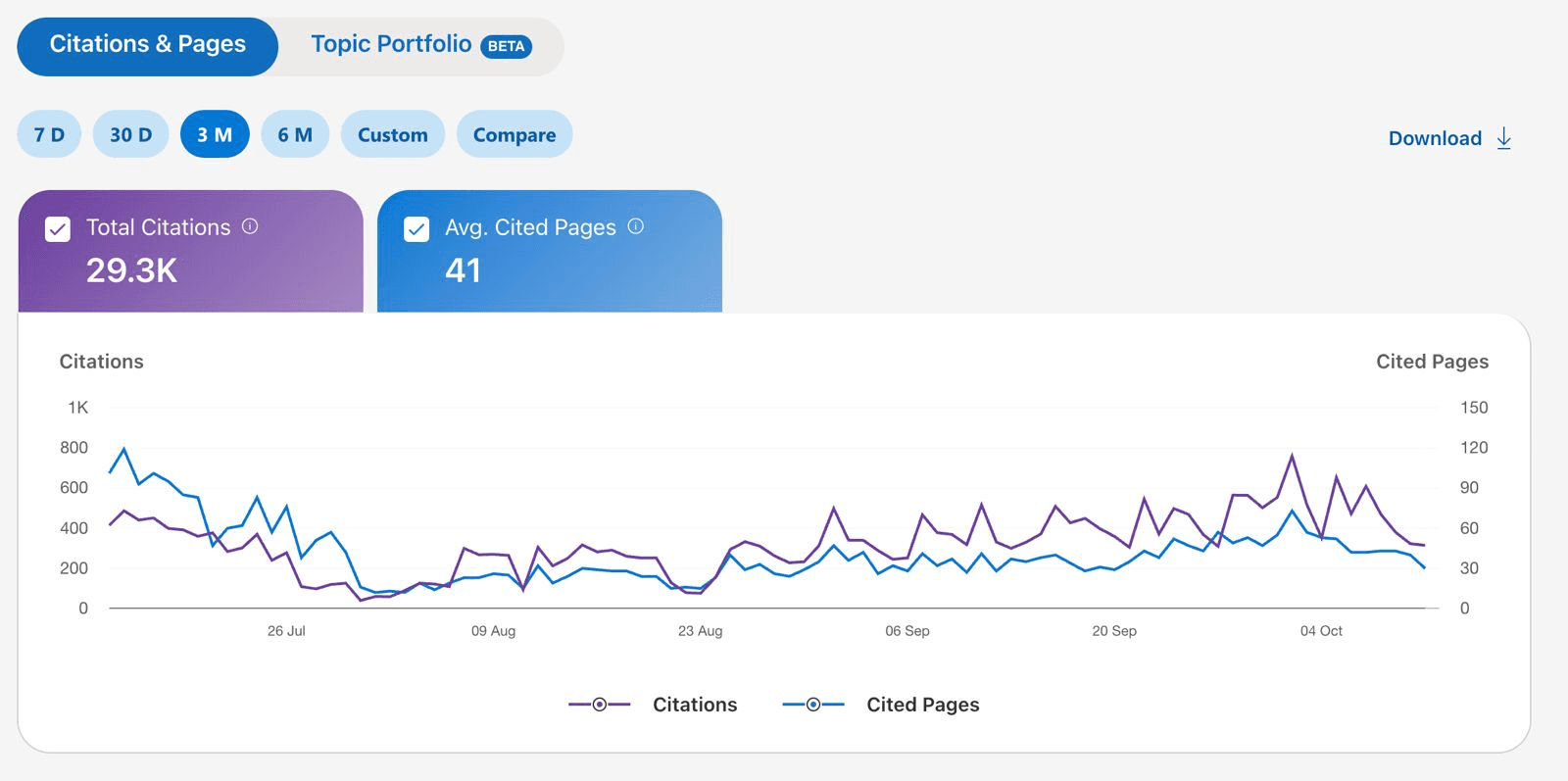
Bing Webmaster Tools has the closest thing to a free citation counter: an AI Performance report showing how often Microsoft Copilot and partners cite your pages, and how many different pages get cited.
- Verify your site at bing.com/webmasters (you can import it from Google Search Console in a couple of minutes).
- Submit your sitemap and turn on IndexNow if your CMS supports it.
- Open the AI Performance report and set the range to 3 months.
- Log total citations and cited pages in your sheet each month, and note which pages appear most.
It’s Microsoft’s ecosystem, not ChatGPT’s, but the trend is a useful early signal of which pages AI assistants find worth citing, and those are the pages to strengthen first.
Step 7: Check Google AI Overviews in Search Console
Google counts AI Overview and AI Mode traffic inside the normal Search Console Performance report, under the Web search type. Google confirms there’s no separate filter. So watch for two patterns instead:
- Impressions up, clicks flat on informational queries: often an AI Overview answering the question above your result.
- Branded searches rising: people who saw your name in an AI answer and searched for you directly later.
Step 8: Ask your customers
Add “ChatGPT or another AI assistant” as an option to your “How did you hear about us?” question on signup and demo forms. It catches the buyers analytics misses: someone who read your name in ChatGPT on their phone and typed your URL on a laptop two days later. It’s also the simplest way to show leadership that AI answers bring in real buyers.
How to check what ChatGPT says about you
Being named isn’t enough if the details are wrong. Once a quarter, run your brand prompts and check every fact in the answer against your own pages:
- Pricing: plan names, starting price, free tier, per-seat costs.
- Features: anything it says you do or don’t do, especially integrations.
- Positioning: who it says you’re for (“best for enterprises” when you sell to startups is a real cost).
- Comparisons: what it says you do better or worse than named rivals.
- Stale facts: old pricing, retired products, a previous company name.
When something’s wrong, click the sources. The error almost always comes from a page: an old review, an outdated listicle, or your own pricing page from last year still sitting in the index. Fix your pages first, then contact the third-party sites with the correct details.
A one-page monthly report
Keep the report short enough that someone reads it. This format fits on one page:
AI visibility, [month]

Mention rate: 23% (was 17%)   Citation rate: 10% (was 7%)
Share of voice: 18% vs Rival A 34%, Rival B 21%
ChatGPT visits (GA4): 412 (was 288)   “Found us via AI” signups: 9
Copilot citations (Bing): 1,240 (was 960)

Wins: added to “[listicle]”; alternatives page now cited on 3 prompts
Gaps: missing on all 6 discovery prompts; wrong starting price on 2 answers
Next month: pitch 10 cited listicles; fix pricing page; answer 5 Reddit threads
Swap in your own numbers. What matters is the shape: three headline rates, the traffic and signups they led to, and three named actions for next month.
When to pay for a tracking tool
Paid AI visibility platforms such as Profound, Peec AI, Semrush’s AI tools, Ahrefs Brand Radar and Otterly run prompts automatically, daily, across several engines, and chart share of voice against competitors. They’re worth it when the manual method stops scaling:
| Manual sheet is enough when | A paid tool is worth it when |
|---|---|
| You track fewer than 50 prompts | You need hundreds of prompts or several markets |
| Monthly checks are fine | You need daily or weekly trend lines |
| One or two people read the report | Leadership wants a live dashboard |
| You’re still learning which prompts matter | Your prompt set is stable and proven |
Whatever you buy, check that it reports mentions and linked citations separately, shows the actual answers and sources (not just a score), and lets you export your data.
What to do with what you find
| What the sheet shows | What to do next |
|---|---|
| Named, but never linked | Publish clearer answer pages for those prompts so your own pages become sources |
| Linked, but not recommended | Get onto the third-party lists and threads that are cited alongside you |
| Missing on alternatives prompts | Publish an honest “[rival] alternatives” page |
| A rival dominates discovery prompts | Work out why ChatGPT recommends your competitor and get onto the same sources |
| Wrong price or features in answers | Fix your pricing and feature pages first, then the third-party pages repeating the error |
| Reddit threads cited a lot | Join those threads properly; see how to avoid getting filtered |
Common mistakes
- Checking from your own account. It’s personalised. Always test logged out or in a temporary chat.
- Running each prompt once. Answers vary. Three runs per prompt gives you a stable result.
- Changing prompt wording every month. Then you’re measuring your edits, not your visibility.
- Reporting one blended score. Keep mentions, citations, traffic and accuracy separate.
- Ignoring the sources. The cited pages are the most useful part of the answer. They tell you exactly where to get mentioned next.
- Tracking without acting. Every monthly run should end with three actions for the next month.
FAQ
Can I see every time ChatGPT mentions my brand?
No. OpenAI doesn’t offer a report of brand mentions. You sample instead: a fixed set of buyer prompts run every month, plus traffic and survey data that show the effect.
How often should I check brand mentions in ChatGPT?
Monthly is enough for most companies. Weekly makes sense during a launch or a big content push, but answers vary run to run, so short-term swings are noisy.
Why does ChatGPT traffic show as Direct or Unassigned in GA4?
ChatGPT tags links with utm_source=chatgpt.com but no medium, so GA4’s default channel rules don’t match it. Some clicks also arrive with no referrer. A custom channel group using a source regex fixes most of it.
What’s a good share of voice in ChatGPT?
It depends on how crowded your category is. Track the trend against your top three competitors rather than chasing an absolute number. Moving from absent to named on your alternatives prompts is usually the first win.
Do I need a paid AI visibility tool?
Not to start. A manual sheet covers 20–50 prompts well. Pay for a tool when you need daily runs, hundreds of prompts, several markets, or a dashboard for leadership.